


GSTN enables online filing of letter of Undertaking : Instructions for filing LUT online on GST Portal:-
Access the GST Website. The GST Home page is displayed.
Login to the GST Portal with valid credentials.
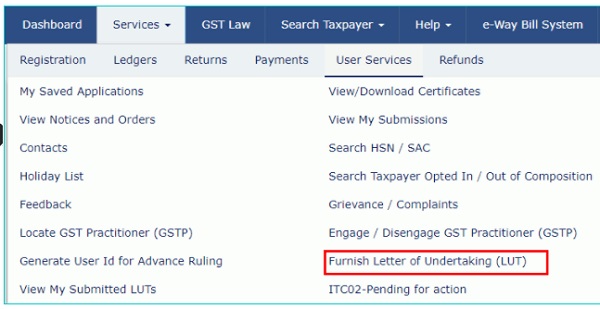
Go to User Services and Select the Tab “Furnishing Letter of Undertaking”
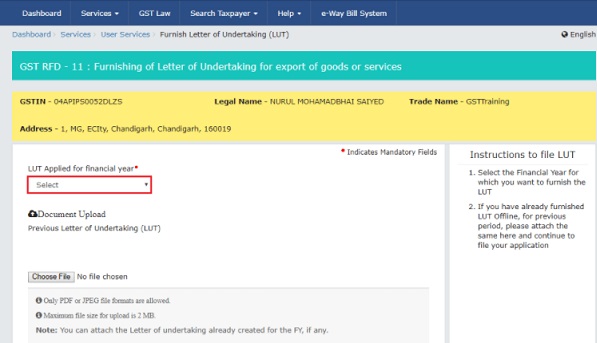
Form GST RFD-11 is displayed. Select the financial year for which LUT is applied for from the LUT Applied for Financial Year drop-down list.
Click the Choose File button to upload the previous LUT.
Note:
- Only PDF or JPEG file formats are allowed.
- Maximum file size for upload is 2 MB.
Select the declaration checkboxes.

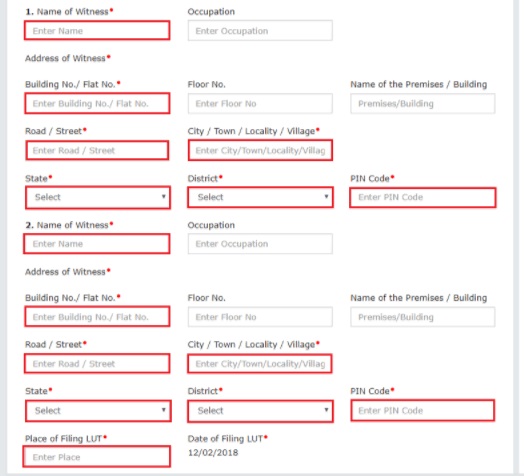
- In the Name, Address and occupation of the independent witnesses section, enter the name and address of 2 witnesses.
- In the Place of Filing LUT field, enter the place.
- In the Name of Primary/ Other Authorized Signatory drop-down list, select the name of authorized signatory.
- In the Place field, enter the place where the form is filed.
Note:
- You can click the PREVIEW button to preview the form.
- You can click the SAVE button to save the form and retrieve later.
If you have already furnished LUT Offline, for previous period, please attach the same here and continue to file your application.
If you’re filing LUT, please read and select all the three checkboxes for accepting the conditions prescribed in Letter of Undertaking.
Click the SIGN AND FILE WITH DSC or SIGN AND FILE WITH EVC button.
